顯示具有 Cydia 標籤的文章。 顯示所有文章

2012年5月27日 星期日

Dashboard X Adds Live Homescreen Widgets to Your iPhone / iPod Touch / iPad


  If you've ever wanted Android-esque widgets on your iPhone, Dashboard X is a new tweak for jailbroken iPhones that allows you to add widgets created for Notification Center anywhere on your home screen.
  Dashboard X sits in your settings menu and pulls all of your preexisting Notification Center tweaks into it automatically (more Dashboard X specific widgets are likely on their way). When you hold your finger down on an icon to enter the re-arrange mode you can tap on any blank area and add a widget. These include simple things like the weather widget, or tweaks like NCSettings or SBSettings. Once you pick the widget you can move it anywhere on the screen. The widgets integrate nicely with the home screen and the process is incredibly simple and intuitive. Dashboard X is a $1.99 download in the ModMyi repository.
P.S. If you wanna get the free version, please add this source in your Cydia below;
www.xsellize.com

2012年4月11日 星期三

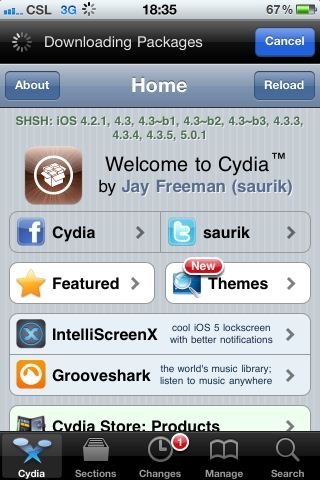
Cydia 支援 iOS 5.0.1 SHSH blob 備份了

不知是否 Cydia 也準備為 iOS 5.0.1 完美 JB 出現而進行升級,現在用戶已經可以在 Cydia 首頁看到 SHSH 對 iOS 5.0.1 的支援了!以味著 Cydia 能夠為用戶提供 iOS 5.0.1 SHSH 備份,日後如果升級到 iOS 5.1,想降回 iOS 5.0.1 就可以透過其他工具實現。例如近來 Redsn0w 已提供了降級功能,未來要降級就變得更簡單了!

iOS 5 也沒有的 Apps 切換特效 Cydia 實現

Source: http://www.newmobilelife.com/2011/09/08/cardswitcher/


JB 激發創意!一套名為 CardSwitcher 的小工具登陸 Cydia 了!它的作用就是讓 iPhone 可以實現 WebOS 一般的 Task Switching 效果,看看影片你便會感受到它的吸引了!由於這種效果可能已被 HP 專利化,Apple 當然不會搬到 iOS 吧…但 Cydia 就收留它!

  • 軟件名稱:CardSwitcher
  • 軟件收費:US$1.99
  • 要使用 Cydia Apps 必須先進行 JB,未 JB 的朋友可參考教學
  • 下載位置:Cydia
  • 示範影片

2011年5月6日 星期五

[教學]備份Cydia Apps的方法

現在有一個簡單的方法去backup所有jailbreak apps,,tweaks和themes。大家可以短時間內更新,破解iPhone和保留jailbreak的apps。

呢個方法就係將大家所有的packages保存在移入電腦的text file。當更新和破解iPhone後,再將那個text file移入iPhone.

1.)Back up Packages

  • Step 1: 在iPhone執行MobileTerminal
  • Step 2: 輸入以下指令:dpkg –get-selections> installed-apps.txt
  • Step 3: 之前的command line會將installed-apps.txt諸存在/var/mobile。之後透個SSH在電腦儲存這個file

2.)重新安裝你的Packages

當更新到新的iOS,將會重新jailbreak和在Cydia安裝 MobileTerminal。以下係指引:
  • Step 1: SSH入部iPhone,接着複製“installed-apps.txt”入/var/mobile.
  • Step 2: 在MobileTerminal輸入以下指令
    • su
    • alpine (which is the default password. Type your password if you changed it)
    • dpkg –set-selections
    • apt-get dselect-upgrade
當遇到任何問題,輸入apt-get dselect-fix-missing-upgrade
Cydia 會自動重新安裝所有packages.